

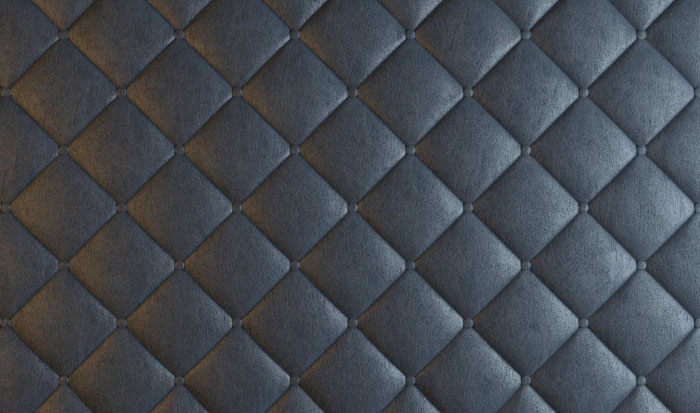
I bet all of you have seen and used furniture with quilted upholstery. And it can not be otherwise, because it is widespread in the furniture industry for many years and is still used in modern interiors.
However, if you ever had to model interior elements like these, then you know that this is not an easy or a quick task.
Fortunately Ivan Druzhinin from Fountain Tools has made an interesting and useful script for easy modeling of quilted elements in 3ds Max. The script is called diaRhombus and can be downloaded for free from Fountain Tools’s website.
As you can see from the video, it is very easy to work with the script. With diaRhombus you are creating a rough model of the upholstery, then apply Turbo Smooth modifier, which forms the details. The script is not suitable for modeling of complex objects such as sofas, armchairs, etc., but is ideal for straight, cylindrical and curved walls and elements.
diaRhombus Parameters
https://vimeo.com/83493148
Rhomb Sizes Group
- Width – width of each rhombus
- Length – length of each rhombus
- W count – count of rhombus by width
- L count – count of rhombus by length
- W plane – total width
- L plane – total length
- Lock Width/Length – lock width/length
- Lock W/L plane – lock total width/length
Rhomb Details Group
- Check Corner – enable CORNER algorithm
- Check Chamfer – enable CHAMFER algorithm
- Chamfer – chamfer value
- Depth – “height” of rhombus
- Scale – scale of rhombus
- Extrude – additional rhombus height
- auto edges – anable it for best TurboSmooth or MeshSmooth
- treshold – angle for “auto edges”
Rhomb Donations Group
- Loop W, Loop L – tile generation
- C1, C2, C3, C4, S1, S2, S3, S4, R1, R2 – corner, side and center elements
- Buttons – button enabler
- Scale (buttons) – button scaler
- Depth.% – random depth
- Scale.% – random scale
- Seed – add a different number for material ID when using Multi/Sub-Object material
I hope that this script will be useful for you and will save you time and efforts while modeling quilted elements in 3ds Max. The image to this publication is done by diaRhombus, so you can see the end result from its use.
 Preserve the colors of objects when inserting dwg file into 3ds Max and moving them to new layer
  Create precise lines in 3ds Max with miauu’s Polyline
  5 free scripts for faster work with 3ds Max
  VR Sun Tool for 3ds Max – Easy V-Ray Sun
  Optimize your scenes with Teague Scene Checker
  Clean up geometry of objects in 3ds Max
link doesn’t work
Hi, Thanks for letting me know about this problem. The link is updated.
Great read Mladen, much appreciated! +1
Thanks Alex, glad that you like it.