

The problem
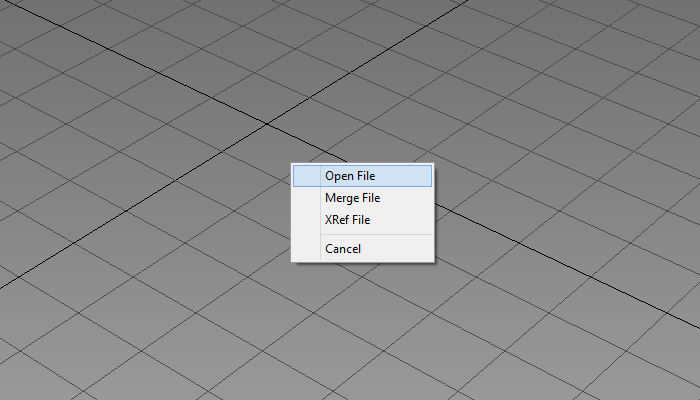
If you are using the new Microsoft operating system – Windows 8, you may have noticed that Drag and Drop does not work anymore. This means that you can not load files by simply “throwing” them directly into the open program window. I was surprised when this problem appeared and since I’m used to this feature in Windows, I decided immediately to find a solution.
The cause
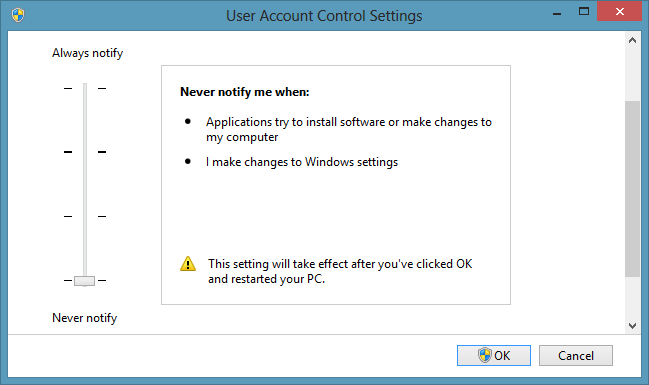
It turned out that the reason for the loss of Drag and Drop in Windows 8 is very simple and it is due to the first thing I hated in Vista. And this is User Account Control or UAC. This “controller” constantly interfere in my work and it is the first thing that I turn off after installing Windows.
The purpose of UAC is to protect you from viruses, hackers etc., by not allowing you to perform certain operations that are considered dangerous. Or by asking you twice for everything. In Windows 8 UAC have more power than before, and this can confuse the way you work with your computer. For example, besides the loss of Drag and Drop, it will not let you save a file out of standard Windows folders – Documents, Downloads, Music, etc.
The solution
There is a standard way to turn off User Account Control from the Control Panel, but thus only stop pop-ups that ask if you are unsure of this or that. To regain control over the operating system and the function Drag and Drop, is necessary to browse in the Windows registry to disable UAC completely. Here’s how:
- Press Windows + R buttons.
- Type Regedit in the window that appears.
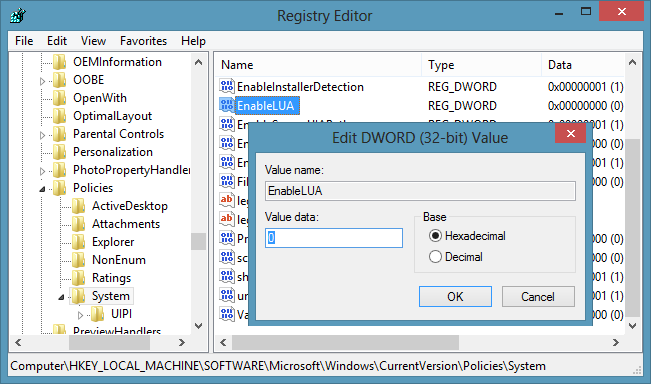
- This will open Windows Registry Editor.
- You have to go to: HKEY_LOCAL_MACHINE > SOFTWARE > Microsoft > Windows > CurrentVersion > Policies > System
- Find the key EnableLUA, and change 1 to 0.
- Press OK and restart the computer
After the restart, Drag and Drop should work for all programs.
 Preserve the colors of objects when inserting dwg file into 3ds Max and moving them to new layer
  Embedding AutoCAD drawing in your website with ShareCAD
  Infographic: Photoshop CS6 Shortcut Keys
  How to model a pillow in Marvelous Designer
  Photorealistic Grass – New Video Tutorial From Viz-People
  Basics of making selections and using masks in Photoshop
Brilliant! Thank you! Worked perfectly 🙂
thank you
This solution worked for me in my Windows 8.1 system. Thanks for the solution
it works but windows 10 photo viewer stops working unfortunately. i hope microsoft will solve this issue in this decade.
Works but disables some useful Windows 10 functions
Excellent, thank you. This worked for me and i hope it solves some of the other issues where messages pop up that i need admin rights to copy or move when i AM an admin and i had UAC turned off. Stupid Windows 10
I came to computers late in life. Now 62, I used this solution today on my Windows 10 desktop where the ‘drag and drop’ has been a complete pain. Using your method, I am pleased to report that the result was immediate and that I could play my MediaMonkey media player again. The results of which have made this old computer user a very happy man. I had to post to say ‘thank you’. So I say thank you again!
Thank you, sir for your comment 🙂 I am hapy that was able to help you.
Thank you! It worked!
Totally worked! Thanks!
The problem is that you can’t use any metro apps with UAC disabled. I have yet to find a solution that would allow for both.
thanks that helped me with inkscape, i didn’t even need to reboot
how about dragging and dropping files within folders? Is there any way to change windows 8 so that I can move files about as I want within a folder, and not just ‘sort by….. name, date or whatever’?
Hi Mladen, I dont understand why this works for me for sometime and when i restart my system again it doesnt…so i have repeat this process again and again everytime I shut off the computer….Any solutions???Would really appreciate!
Страхотно! Как ме мъчеше тази глупост!
this totally helped me fix my issue with paint tool sai! thank you so much. (:
I followed this path … but it did not get me to EnableLUA
HKEY_LOCAL_MACHINE > SOFTWARE > Microsoft > Windows > CurrentVersion > Policies > System
So maybe on Windows 8.1 the options need to be changed in the path again. ???
THANKS, Pete
Hi Pete,
The key is there, I am using Windows 8.1 and I can see it. You have to mark System folder and you will see it in right part of the Registry Editor window.
Hope this helps 😉
did not work for me. But I really wish it would!
I followed your sequence of steps.
when I get to: SYSTEM then the choice is Audit or UIPI
If I choose UIPI then the only option is Clipboard
There is no EnableLUA
Go to regedit, export the system key and save the file somewhere on your PC. Remember to change the value to 0 in EnableLUA. This is the path – HKEY_LOCAL_MACHINE > SOFTWARE > Microsoft > Windows > CurrentVersion > Policies > System
Wow its works like a charms dude
This really help me. My english skills is really bad but i understeand the instruction and it work. Thank you, u save my life 🙂
Thank you for posting this. Unfortunately, it didn’t work for me – I’ve lost all drag and drop privileges within Windows 8.1, despite being the admin user (and the only user, for that matter), and giving this a shot. Back to the drawing board, I suppose.
I’m having a weird variant of this problem using win 8.1 pro.
For most copy or move operations, drag and drop works fine. For a few sources or destinations, windows requires use of the ‘copy to’ or ‘move to’ buttons on the ribbon. I wouldn’t mind disabling this so I could drag and drop anywhere. But the real problem is that when I try to copy files to my Nook tablet, it refuses to copy files to the device. I get the error message ‘The folder This PC\MyNook\Internal\{etc.}’Can’t be used. Please choose another folder.’ I can create folders on the device and move files from the device to the computer. But it won’t let me put files on the device. I don’t know if this is a win 8.1 problem or a Nook problem, but the fact that I can do the other things suggests the former.
Hi Paul,
Sorry for late reply. I don’t have a Nook tablet, I was trying to reproduce the situation with my Android phone, but everything is ok with it. Drag and drop is working fine.
The error that you see ‘The folder This PC\MyNook\Internal\{etc.}’Can’t be used. Please choose another folder.’ sounds like an UAC restriction. I was getting the same error after fresh Windows install and when I was trying to save something in a folder different then standard Windows folders – Documents, Downloads, Music, etc. Are you sure that you have turned off UAC completely?
Regards,
Mladen
I tried your solution , and now I can drag and drop files . However , I cannot open PDF files now . I get a message saying “this application cannot be activated when UAC is disabled” . It seems that your solution to one problem just causes another elsewhere ! Windows 8.1 just seems to be designed to be as awkward as possible , give me Windows 7 any day .
Hi Barry,
Yes, disabling UAC completely stops some start menu programs to work. I suppose you are opening pdf files with Windows Reader. You can try to use external pdf software and see if it is working for you.
I don’t use any windows start menu programs and Windows 8 is good enough for me.
Regards.
Thanks so much. My new Acer is now starting to act ‘normal’, and user friendly.
Thanks so much for this! Spent hours trying to find a solution and this finally worked. 🙂
+Anthony Garcia you probably had a virus or something that was blocked by the UAC so once you turned it off, the thing did it’s work, that’s just a theory, there might be a lot of other things
i can’t find EnableLUA no where in windows 8.1 like that.
Hi Jim,
I’ve just checked all steps in Windows 8.1 and everything is the same like in version 8. Make sure you follow the correct path in regedit: HKEY_LOCAL_MACHINE > SOFTWARE > Microsoft > Windows > CurrentVersion > Policies > System
Didn’t work for me.
Finally worked!Thanks a ton..:)
Or, just right click, instead of left click. Might be easier.
watch out for this,
I made this on my i7 macbook bootcamp windows 8, and the CPU usage lock on 100% full time !!!
Hi,
Thank you for your feedback. I have done this on two computers and never had any problems.