Как да премахнем“Produced By An Autodesk Educational Product“

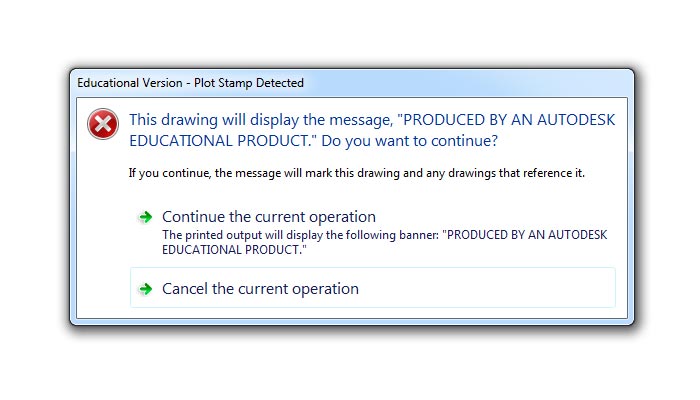
Случвало ли ви се е да отворите .dwg файл, който примерно ви е бил изпратен по имейла, и да се появи този надпис – Produced By An Autodesk Educational Product. Ако копирате някой елемент от такъв чертеж и го поставите в друг, той също ще бъде „заразен“ със същото съобщение. Освен това надписът се появява на четирите страни на листа, ако се опитате да плотирате нещо.

Това предупреждение се появява, когато файлът е бил създаден с учебна версия на AutoCAD. За да се отървете от този проблем трябва да извършите следните стъпки:

1. Отворете „заразеният“ чертеж.
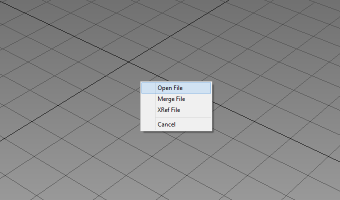
2. Напишете dxfout в командния ред (или изполвайте Save as – Other formats – DXF).
3. Запишете чертежа във формат dxf някъде на вашия компютър.
4. След това въведете в командния ред dxfin (или използвайте Open – DXF).
5. Отворете файла, който създадохте преди това.
6. Запишете чертежа във формат dwg.

Надписът „Produced By An Autodesk Educational Product“ би трябвало да изчезне.
guest
2 Коментара
Newest
Oldest Most Voted
Inline Feedbacks
View all comments
Стилиян
Стилиян
20/03/2012 19:08

Много полезна статия

How to remove „Produced By An Autodesk Educational Product“

Have you ever opened a .dwg file and when you do, you get the notice – Produced By An Autodesk Educational Product? If you copy an element from this drawing and paste it into another, it will be „infected“ too. Moreover, the inscription appears on all four sides of the sheet when you try to plot the file.

This warning appears when the file was created with the educational version of AutoCAD. To get rid of this problem you must perform the following steps:

1. Open „infected“ drawing.
2. Type dxfout in the command prompt (or use Save as – Other formats – DXF).
3. Save the drawing in dxf file format somewhere on your computer.
4. Type again in the command prompt dxfin (or use Open – DXF).
5. Open the file, which you have created earlier.
6. Save the drawing in dwg file format.

The notice „Produced By An Autodesk Educational Product“ should be removed.

guest
47 Коментара
Newest
Oldest Most Voted
Inline Feedbacks
View all comments
Arjun
Arjun
08/04/2023 18:57

It’s very helpful. Thank you❤

sultan
sultan
08/03/2022 07:15

thanks dear this steps is very helpfull.
1. Open “infected” drawing.
2. Type dxfout in the command prompt (or use Save as – Other formats – DXF).
3. Save the drawing in dxf file format somewhere on your computer.
4. Type again in the command prompt dxfin (or use Open – DXF).
5. Open the file, which you have created earlier.
6. Save the drawing in dwg file format.

The notice “Produced By An Autodesk Educational Product” should be removed.

Mainata ot Brooklyn
Mainata ot Brooklyn
21/05/2020 16:46

Maina,
ne raboti v AutoCAD 2021-Znaesh li drug nyakakuv trick to convert student into General Use

VASANTH
VASANTH
20/11/2018 12:16

THANK YOU

david
david
22/10/2018 13:14

thank you ….

ess
ess
13/06/2017 04:05

thank you .. this video solved my issue

Ash
Ash
07/11/2016 03:55

This worked for a drawing that was opened in AutoCAD 13. Thank you very much!

Rajitha
Rajitha
17/03/2016 08:26

Thanx for the solution 🙂

ARUNA K
03/02/2016 09:47

I JUST TRY THIS IN 2007 BUT I CAN’T ABLE TO REMOVE THAT.GIVE ME A SOLUTION

mehdi kamali
30/01/2016 11:21

it really worked out! thanx

Ammad
Ammad
04/10/2015 10:04

to remove „autodesk educational product stamp“ i tried hundred times once i do dxfout and than open in dxf again it shows nothing by giving a message on the bottom invalid entry… if i will able to open the file in dxf than i can save it but it is not opening as dxf file too many methods tried but in vain. tried in different versions also to remove stamp but still facing problem

Tjernobog Akeldama
26/09/2016 05:07

not working for me. Whenever I open the saved „.dxf“ it says „invalid or incomplete DXF input – drawing discarded“

Catherine Fernius Witt
10/05/2016 22:11

Works with Autocad LT 2014, from file in Autocad LT 2007.

Just make sure you are entering the dxfin prompt WITHIN the existing infected drawing. It will open up a separate file anyway and that’s the clean file you will use.

Līga Strode
02/08/2016 18:23

Is it posible that this wont work if the file ir too big? Several plans of the teritory and a lot of tach!

Līga Strode
09/05/2016 21:56

using aCad 2010 – doesn’t work! 🙁
It wont opet. It says I have to press ENTER to finish command and then – nothing – empty file!

Ezerina Abdul Kadir
28/04/2016 17:41

Thank you very much!
Even im using Acad2004, it works!

Joannie Van Daele
14/04/2016 04:19

Thanks a lot! It works!

Con Tour
18/03/2016 02:48

hahaha! T.Y. dude!

Harshad Kanaiyalal Ashodiya
31/01/2016 15:11

Thanks …

Bích Chi's
24/12/2015 04:42

thanks dude !!!

Tu Ya
22/12/2015 11:36

Gracias! 😀

Md.Raznur Rahman.
31/10/2015 08:26

many many thanks, i did it 🙂

Er Dinesh Thakur
26/10/2015 06:34

how to remove produced educational version 2008 autocadd please help me this point

Temitope Alao
14/08/2015 16:52

MyThanks email is ttopealao@yahoo.com.

Temitope Alao
14/08/2015 16:51

I have a problem in removing the educational Product from my print, I ve tried the prescribed solution,but could not succeed. I could not succeed o save as to .dxf. It says it could not save. Is it because am using Autocard 2014? pls. can you help me out.

Naga Rajan
29/07/2015 05:01

THANKS WORKS GREAT…

Jasminka Stamenkovska Dinevska

great info, thanks a lot

Ilanit Argaman
09/06/2015 09:49

Thank you so much!!!

Faiz Asfar
16/04/2015 08:47

this way i know but anymore manual setting possible please inform me.
my mail id asfarfaiz@gmail.com please help me

Fiyinfoluwa Akinbowale
09/04/2014 12:17

I LOVE YOU MAN

Saurabh Seth
17/10/2014 05:07

Jeez ! Ur damn great.

Ar Alfin Jackson
06/10/2014 07:25

awz !!!!!!!!!!! cool dude and thnkz a lot

Aju Ajmal
22/08/2014 08:50

thanks dear…………..:P

Amine Ben Taieb
28/05/2014 13:35

Thanks a lot )

Galin Vutov
21/05/2014 13:35

its work ! good job 🙂

mohamad marwan
mohamad marwan
19/06/2015 12:54

Hi
I have a problem
When I want to open an AutoCAD file I got from my boss
A message appears that the following files are missing
GEO.SHX
RADd.SHX

ANSI
10/03/2015 09:59

Thanks for sharing this post with us. It will help us more.

hiren
hiren
03/03/2015 13:55

🙂

hiren
hiren
03/03/2015 13:54

I tried it worked Thanks

IVRCL
23/02/2015 18:27

hi, i got it but my file size is too heavy ?

Girish M
Girish M
21/10/2014 12:21

I tried it worked Thanks 🙂

MUTHIALRAJ SEENIVASAN
13/08/2014 08:36

HI
THANKS FOR THE SUGGESTION. NICE. IT WORKED WITH ACAD2010.
REGARDS
MSEENIVASAN

Johnny
Johnny
25/07/2014 17:19

Hi, I tried this solution. But I still couldn’t solve the problem. I’m using AUTOCAD 2014 version. Any idea how and why? Thanks a lot.

iffi_malik@yahoo.com
22/10/2013 14:07

my autocad has problem that it (produced by an autodesk educational product)

Top